I’ve been working on my site design and build for the last couple of months now, and I’m really happy to finally launch, even if it’s a little bit behind schedule!
The site is built with Vue 3, Typescript, and Tailwind CSS. I’m also using Vite for the frontend tooling on the project.
At the outset I had a handful of goals for the project:
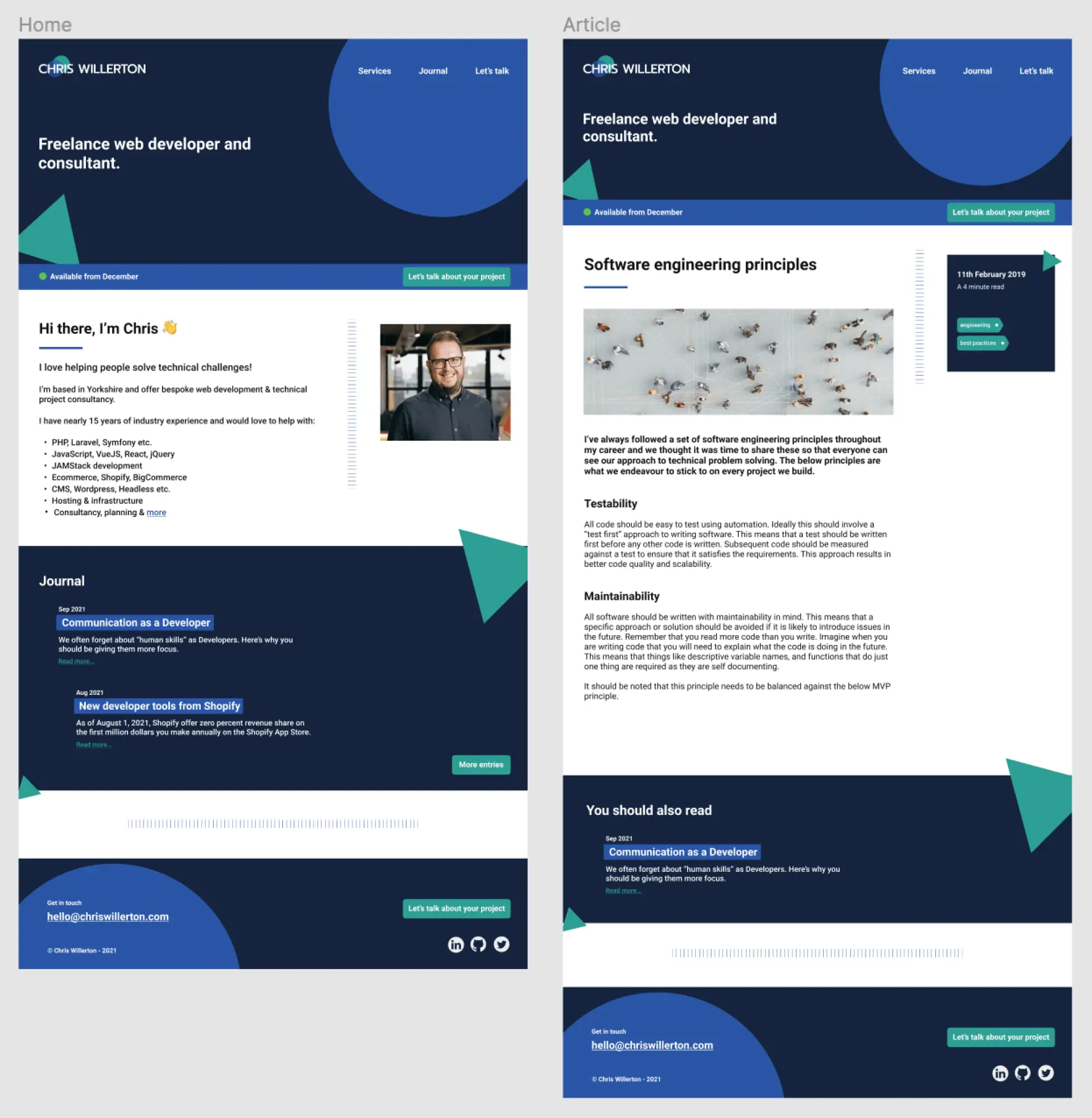
Learn more about Figma and improve my limited design skills.
Utilise a modern stack - Vue 3, Tailwind etc.
Learn more about Typescript.
Host on S3 with some sort of CDN.
Ensure site speed and performance are high.
I think I’ve managed to deliver on these objectives, learning some new skills, and also solidifying some things in the process.
See below for my thoughts on each objective and how it went.
Learning more about Figma
I’m not a designer. I imagine that is fairly obvious to the visually skilled out there 😄
I do however have a keen interest in making things look nice and clean. I especially like to lean on what I know is possible in tech to inform a design - this makes it easier to achieve goals like high page speed values.
Figma as a tool is something that I have really enjoyed using, and I would thoroughly recommend that people give it a try if they haven’t already. It’s super easy to work up designs, share progress with stakeholders, and also export assets when it comes to build.
Using a modern stack
Vue3
I’ve been using Vue since version 1 and I’ve always loved working with it. Version 3 does slightly depart from previous versions with the composition API (should you want to use it), and I do find that I prefer it over the options API now that I'm used to it.
My site is only a small project, but it’s very clear how much easier it is to organise or group blocks of code around the functions they perform, and it’s easy to create reusable elements/functions for use across the site. It also removes some of the setup boilerplate for components if you use <script setup> which means files can end up being really lightweight. This is easily one of my favourite aspects.
<script lang="ts" setup>
Tailwind CSS
Alongside Vue 3, Tailwind is a joy to use. I’ve been using it for a while, but again I am completely sold and would take some convincing to choose another framework at this point. For me the ideology just clicks, but I do love how you can still abstract out to your own classes using tools like @apply should you want to repeat a whole series of styles.
Couple this with how lightweight the end build file is and I think it’s hard to beat these days.
Learning Typescript
I’ve wanted to use Typescript in a new project for a while now, but have never quite managed it for one reason or another. Originally coming into JavaScript (many years back...) with more of a software head, I feel right at home with types and interfaces.
Having said that, I can understand why someone would find Typescript confusing or annoying, but personally I feel that it pushes you to write better code and makes you feel much more confident with your data and scalability.
Vite also sets up a Vue3 and TS project nicely so everything is supported out of the box. I did have to look up a few things, especially around declaring types for some unsupported third party libraries, but like most things in software if you take time to read the error/info that TS gives you and think it through, then it usually becomes clear.
Hosting on S3 and CDN
With this build I knew I wanted things to be fast. I’ve built SPAs before, but not using the complete stack above so I was excited to get stuck in. Vue router is the main workhorse behind the SPA aspect, but you do need a different mindset to a traditional build, especially "without a backend".
A new goal for the site is to add a contact form that integrates with AWS Lambda to send me an email, so I’m also looking forward to implementing that and carrying the mindset on.
Amazon S3
I’ve used S3 throughout my entire career, but usually just as a container for things like user uploads. I’ve never actually hosted a static site on there funnily enough, but once you know how it’s very simple, and AWS make it easy to achieve.
Cloudflare as a CDN
I nearly just used Cloudfront from AWS having used it before many times, but in the end I went with Cloudflare. The main two reasons are that for my use case, it will likely cost me nothing, and secondly, Cloudflare is obviously a big player on the web these days and I wanted to try their service having not used it before.
So far it’s been great. There is a fair amount in the dashboard to look over and understand, but you’ll be fine if you've been anywhere near the AWS dashboard recently.
It’s really great to have that additional performance and security in place.
Optimising for pagespeed
I’ve always maintained that a good pagespeed score (from a Google insights point of view) can be difficult to achieve, especially for bigger or older sites. As with many things in software, a simple decision made today can cause headaches later when the powers that be decide something should be done a particular way (step in Core Web Vitals). I thought this was a good opportunity to revisit what it takes to get into the high nineties on that illusive speed score.
At the time of writing the scores were as below, and I’m very pleased with the results ⚡️.
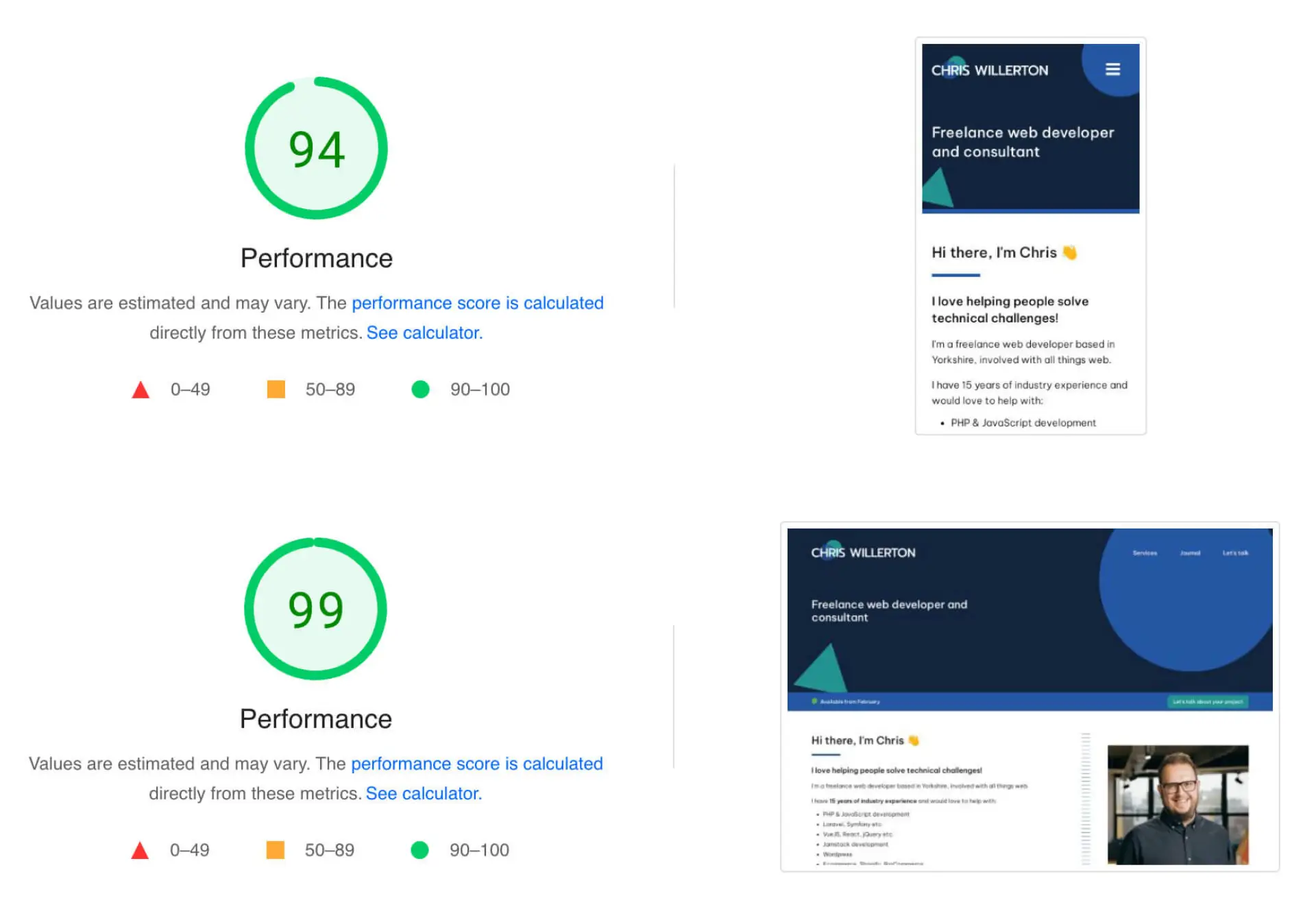
Admittedly, my site is relatively simple when compared to others, but honestly the main thing that has helped is having the pagespeed goal in mind throughout the build. I think it can be difficult for developers to communicate to stakeholders that you can’t always have everything in this arena. To get into the high scores you often need to make some compromises, or at the very least some strategic choices. With this in mind my advice would be to make sure it's one of your main goals when starting a project.
I have more thoughts on this which I’ll share in a future post, including some tips on how I optimised for performance with this site.
Overall, a strong launch 💪
All in all I’m very pleased with the outcome and the tech choices I’ve made for the site. It’s not the right approach for every project, but for this it’s worked really well, and it's been a pleasure to work with the tools mentioned above.
Watch this space for more info on my approach and some deep dives into my favourite aspects of the tech I used.